Free AI Tool to Remove Logo from Video Online
Upload Your Video
Drag and drop or click to select your video file
Drop your video here
or click to browse files
Want to remove logo from video? Our advanced AI technology makes it easy to remove logo from video files automatically. Whether it's a watermark, a brand logo, or an unwanted object, we help you remove logo from video seamlessly without quality loss. Try our free tool to remove logo from video today!
Trusted by Users Worldwide to Remove Logo from Video
Our AI tool to remove logo from video has helped millions of users process their videos with professional results.
Videos Processed
Satisfaction Rate
Why Choose Us to Remove Logo from Video?
The best solution to remove logo from video using cutting-edge AI
When Do You Need to Remove Logo from Video?
Unlock the potential of your video content for various scenarios.
Social Media Repurposing
Remove logo from video downloaded from TikTok or Instagram to share on other platforms without clutter.
Clean Up Footage
Remove logo from video clips to make your content look more professional and brand-free.
Content Restoration
Restore original footage by deciding to remove logo from video that distracts viewers.
Presentation Preparation
Remove logo from video used in educational or corporate presentations for a cleaner look.
How to Remove Logo from Video in 3 Steps
Upload Video
Drag and drop your video file (MP4, MOV, AVI, etc.) into the upload area to start to remove logo from video.
Select Logo
Use the brush or box tool to highlight the logo you want to remove.
Download Clean Video
Click 'Remove' and wait for the AI to process. Preview and download your video after we remove logo from video.
Related Video Editing Tools
Discover more ways to enhance your videos with our suite of AI tools.
How to Remove Logo from Video with AI
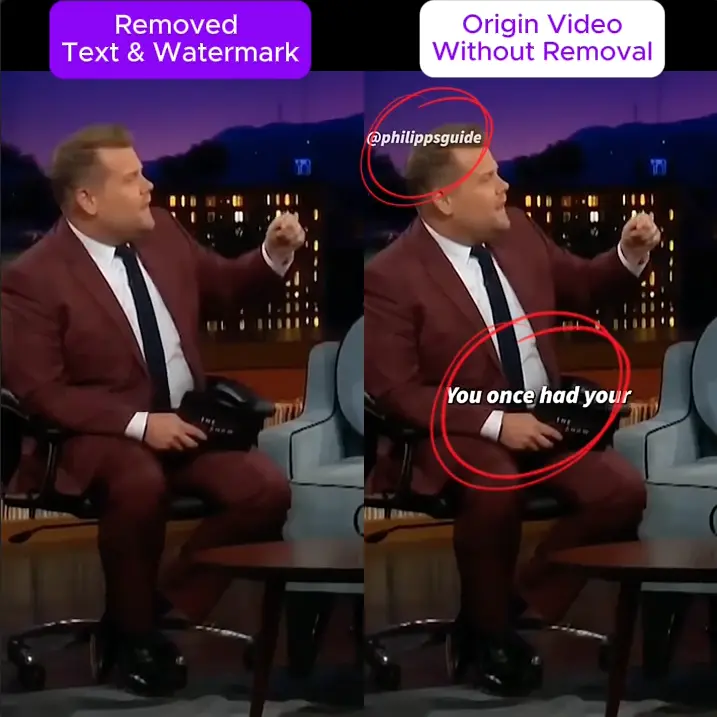
Our tool uses advanced AI to remove logo from video efficiently and seamlessly.
It analyzes adjacent frames to intelligently fill in the area when you remove logo from video, ensuring a natural result without blur.
Fast Processing
Get your clean file in minutes. It's the fastest way to remove logo from video using cloud GPU processing.
Smart Detection
Accurately identifies brand marks to remove logo from video, including semi-transparent logos and watermarks.
What Users Say About How We Remove Logo from Video
Join thousands of satisfied users who use our tool to remove logo from video.
Frequently Asked Questions About How to Remove Logo from Video
Get answers to common questions about how to remove logo from video online
Need more help to remove logo from video? Contact us at support@remover.video